
Since there was problem opening attendify, I missed doing automatic log. Can you please work on lett...
All Questions & Answers
Browse all questions from the community. Find answers about billing, attendance, payroll, and platform usage.
All Questions (9)
A
Anonymous
• 5 months ago
General Question
No access
Can't get in to register
Add a Comment
A
Anonymous
• 5 months ago
Hi you don't need to register you only need to login. What wee watch organization do you work for? Are you a provider?
A
Anonymous
• 5 months ago
Technical Help
No access to Attendify
Unable to log in from 8:00 am to almost 9:00 am. Very slow once I did get in.
Add a Comment
No comments yet.
A
Anonymous
• 5 months ago
Technical Help
No access to Attendify
Unable to log in from 8:00 am to almost 9:00 am. Very slow once I did get in.
Add a Comment
No comments yet.
A
Anonymous
• 5 months ago
Technical Help
Slow loading
We are still having Providers stating that they are having issues. The site is quite slow to open a...
Add a Comment
A
Anonymous
• 5 months ago
Hi could you inform the providers still having issues to share on here so we can support them directly? Thanks.
A
Anonymous
• 5 months ago
@Support_1 It is not an issue with just one Provider, we are also having this issue at the office. If you are saying that this is not a site issue, but individual then we will let them know that.
A
Anonymous
• 5 months ago
@pamela_hennessy_1683 Thanks for letting us know. We are investigating what may be causing it to be slow for your office and some of your providers.
A
Anonymous
• 5 months ago
General Question
Forum
Although we appreciate having the forum to ask questions, stating that we should post here when we a...
Add a Comment
No comments yet.
A
Anonymous
• 5 months ago
Subsidy
Subsidy Co-Pay History
I’m having trouble getting the co-pay history feature to work correctly.
For reference:
December 202...
Add a Comment
A
Anonymous
• 5 months ago
Hello, I checked the copay issue. The copay date change wasn’t entered correctly in the copay history, and no copay date was set in the Co‑pay Information section, so the system defaulted to using the current copay amount.
The copay date change entry in the copay history should be dated "2026-01-01", which is when the amount was updated. The current copay amount's copay date should be "2026-01-01", since that’s when it was first used.
A
Anonymous
• 5 months ago
@Support_2 I will try that and report back! The date in the current co-pay disappears. Each time I open it, there’s no date. It prompts you to enter a date when you save and I enter it, then it’s gone when I re-open it.
A
Anonymous
• 5 months ago
@Wee Watch Windsor West The issue of the current copay date disappearance has been resolved.
A
Anonymous
• 5 months ago
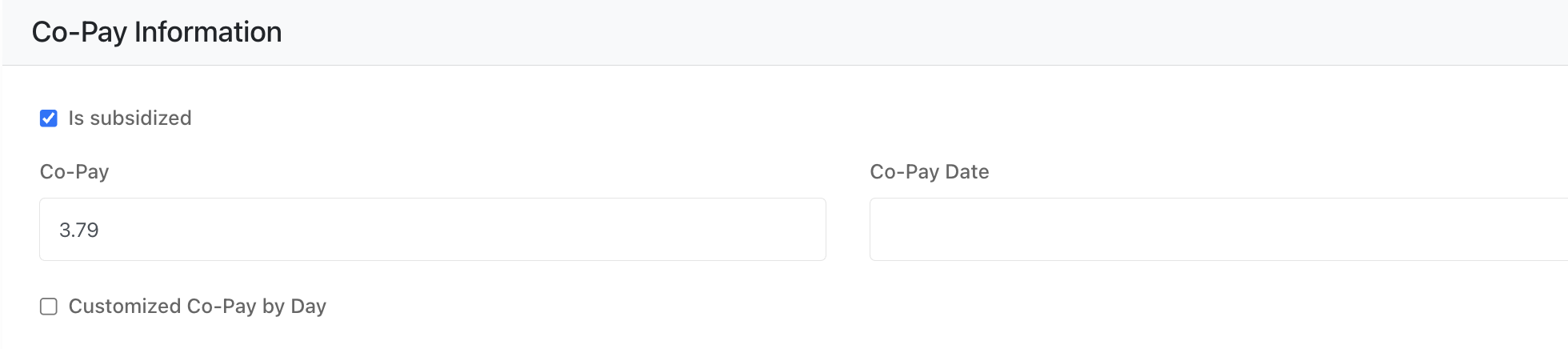
@Support_2 I updated as you explained. The date for co-pay at the top is not saving (Image below). the Dec co-pay is not calculating at $3.59.
A
Anonymous
• 5 months ago
@Wee Watch Windsor West I just corrected the issue.

A
Anonymous
• 5 months ago
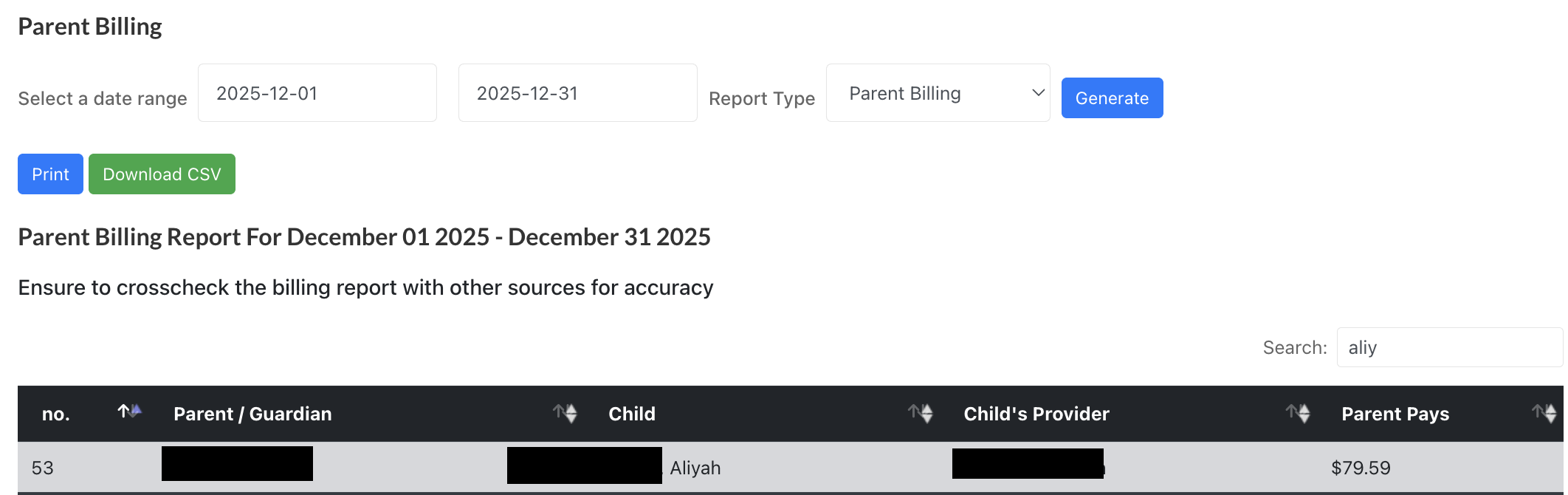
@Support_2 Thank you. I can see the date now. The Dec co-pay is still using the current co-pay and not the historical co-pay for Dec. Did I enter the correct details?

A
Anonymous
• 5 months ago
@Wee Watch Windsor West Would mind showing where it is using the current co-pay for dec ?
A
Anonymous
• 5 months ago
@Support_2 I hope this is helpful while keeping names private.
A
Anonymous
• 5 months ago
@Wee Watch Windsor West Is the Parent Pays supposed to be $79.39?
A
Anonymous
• 5 months ago
@Support_2 For Dec it should be $3.59/day X 21 days =$75.39
A
Anonymous
• 5 months ago
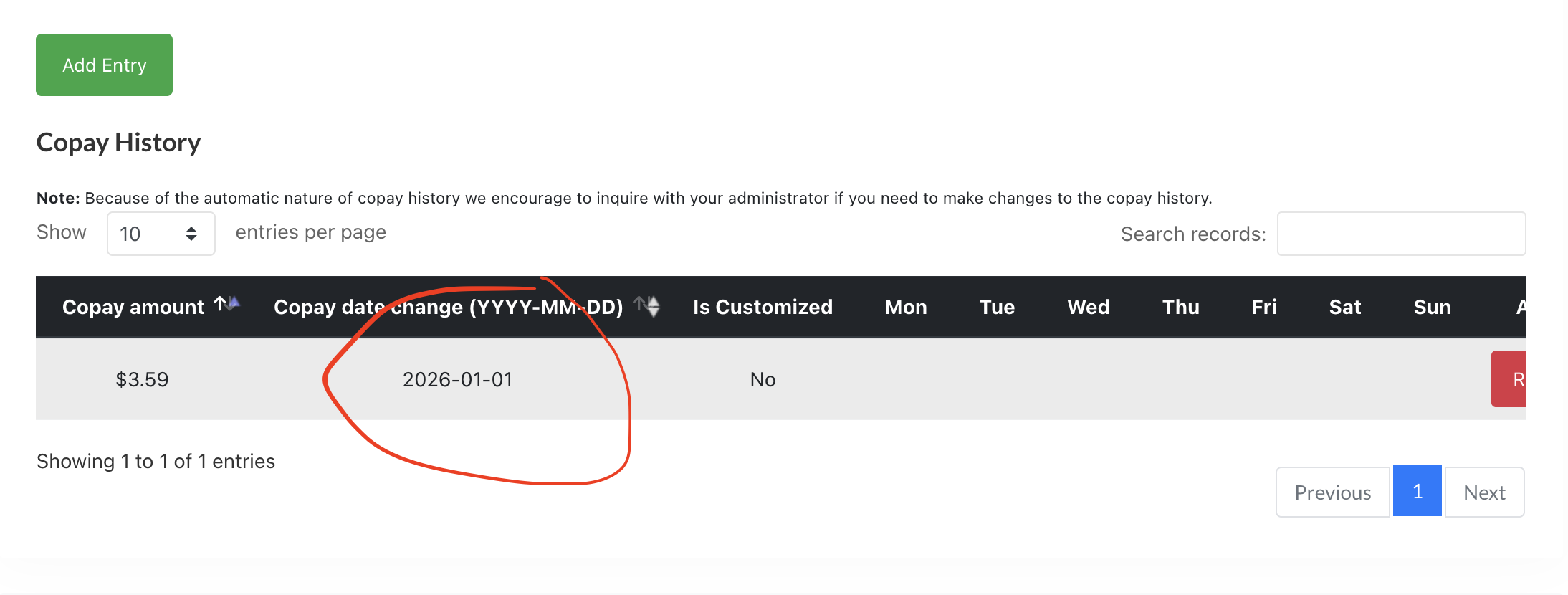
@Wee Watch Windsor West when was the $3.59 applicable for? which time period? on your data it says it was applicable on the 1 of the 1 day of the first month of 2026. I'm guessing it's not meant to be applicable for 2026 -01-01 but for sometimes last year current?
A
Anonymous
• 5 months ago
@Support_1 December 2025: Co-pay was $3.59/day
January 1, 2026: Co-pay increased to $3.79/day
A
Anonymous
• 5 months ago
@Wee Watch Windsor West the naming of the table is what may have caused the confusion. Attached is the screen shot. What you have to do is remove the one you currently have and add that amount for 2025 - dec -01. that would solve the issue. please revert back when fixed
A
Anonymous
• 5 months ago
@Support_1 I previously tied that option as well and it did not pick it up. I just tried it again and deleted the entry in your screenshot but it is unfortunately still not working. Is is defaulting to the current co-pay.
A
Anonymous
• 5 months ago
@Wee Watch Windsor West the previous attempt was right we caught a bug and we have rectified it.
A
Anonymous
• 5 months ago
@Support_1 it should work perfectly now
A
Anonymous
• 5 months ago
@Support_1 Thank you for fixing it!
A
Anonymous
• 5 months ago
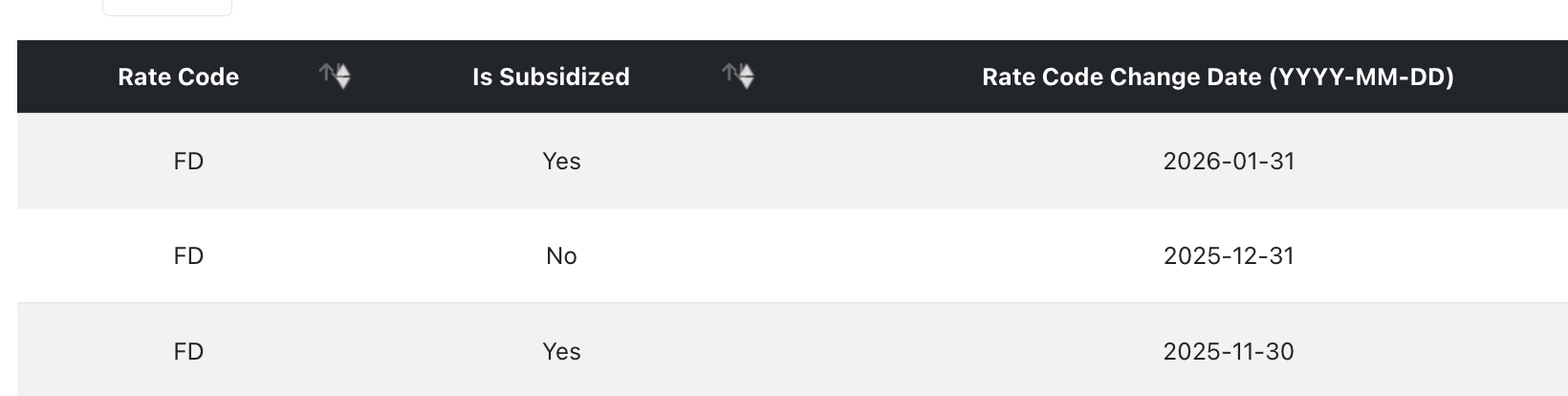
@Wee Watch Windsor West We have another co-pay rate issue now. It was correct before this fix, so thinking it may be connected. 2 children who go back and forth between full fee and subsidy. The parent amount was correct for the full fee months, but it now says $0 for parent amount.
June 1 - Nov 30 -subsidy $0
Dec 1 -31 -full fee
Jan 1 - 31 -subsidy $0
Feb 1 on -full fee.
A
Anonymous
• 5 months ago
@Wee Watch Windsor West Could you share the children's names so we can investigate the issue?
A
Anonymous
• 5 months ago
@Support_2 Thank you. I shared my screen with Lopsii today and walked through it while he investigated what was happening.
A
Anonymous
• 5 months ago
Technical Help
ETS issue
Why do the ETS parent billings and payroll keep disappearing in Sage? This has happened multiple tim...
Add a Comment
A
Anonymous
• 5 months ago
does it show after the entries have been made to ETS? When do you notice it disappearing
A
Anonymous
• 5 months ago
@Support_1 It shows afterwards that’s everything is posted. Then days or weeks will pass and they’ll be gone. There doesn’t seem to be a set timeline for when they disappear.
A
Anonymous
• 5 months ago
@Wee Watch Barrie this may be a sage issue and sadly note an ETS one because we don't control what happens on sage past the entry period. I hope this helps
A
Anonymous
• 5 months ago
Hello! We looked into it and found that you may not be synchronizing from your local sage to the cloud properly. I hope this helps.
A
Anonymous
• 6 months ago
Technical Help
Do you still see this on your login page?
put your thought in the comments

Add a Comment
A
Anonymous
• 5 months ago
Many of our Providers do not like it. I think the original log in page was perfect.
A
Anonymous
• 5 months ago
@pamela_hennessy_1683 It has long been removed and we believe providers should no longer see it.
A
Anonymous
• 5 months ago
@pamela_hennessy_1683 If your providers are still seeing in it. they can comment on here and we can look into it.
A
Anonymous
• 5 months ago
@Support_1 Sorry, I don't have access to the Provider login, I was just sharing what Providers had mentioned when it first showed up. We still see it when we log in, so assumed Providers could too.
A
Anonymous
• 5 months ago
@pamela_hennessy_1683 sorry I'm not sure I understand are you saying your login screen show up like that above?
A
Anonymous
• 5 months ago
@pamela_hennessy_1683 could you please attach to your next response that you see that exact screen? thanks
A
Anonymous
• 5 months ago
@Support_1 If we sign in on our phone it doesn't show, but if we sign in on our laptop then it is there
A
Anonymous
• 5 months ago
@Wee Watch Barrie can you share a screenshot of what you are seeing
A
Anonymous
• 5 months ago
@Support_1 I zoomed it out to try to capture most of the picture.
A
Anonymous
• 5 months ago
@Wee Watch Barrie i'm not sure what you mean. doesn't seem like you attached an image
A
Anonymous
• 5 months ago
@Support_1 It won't attach from my phone...does this work?
A
Anonymous
• 5 months ago
@Wee Watch Barrie here

A
Anonymous
• 5 months ago
@Support_1 it worked from my computer
A
Anonymous
• 5 months ago
@Support_1 I still see this when logging in
A
Anonymous
• 5 months ago
@dloveman842_5754 My screen is like above with that big picture and I need to scroll down for the login box every time
A
Anonymous
• 5 months ago
@dloveman842_5754 what device do you use? and can you put in a screenshot?
A
Anonymous
• 5 months ago
@Support_1 Laptop
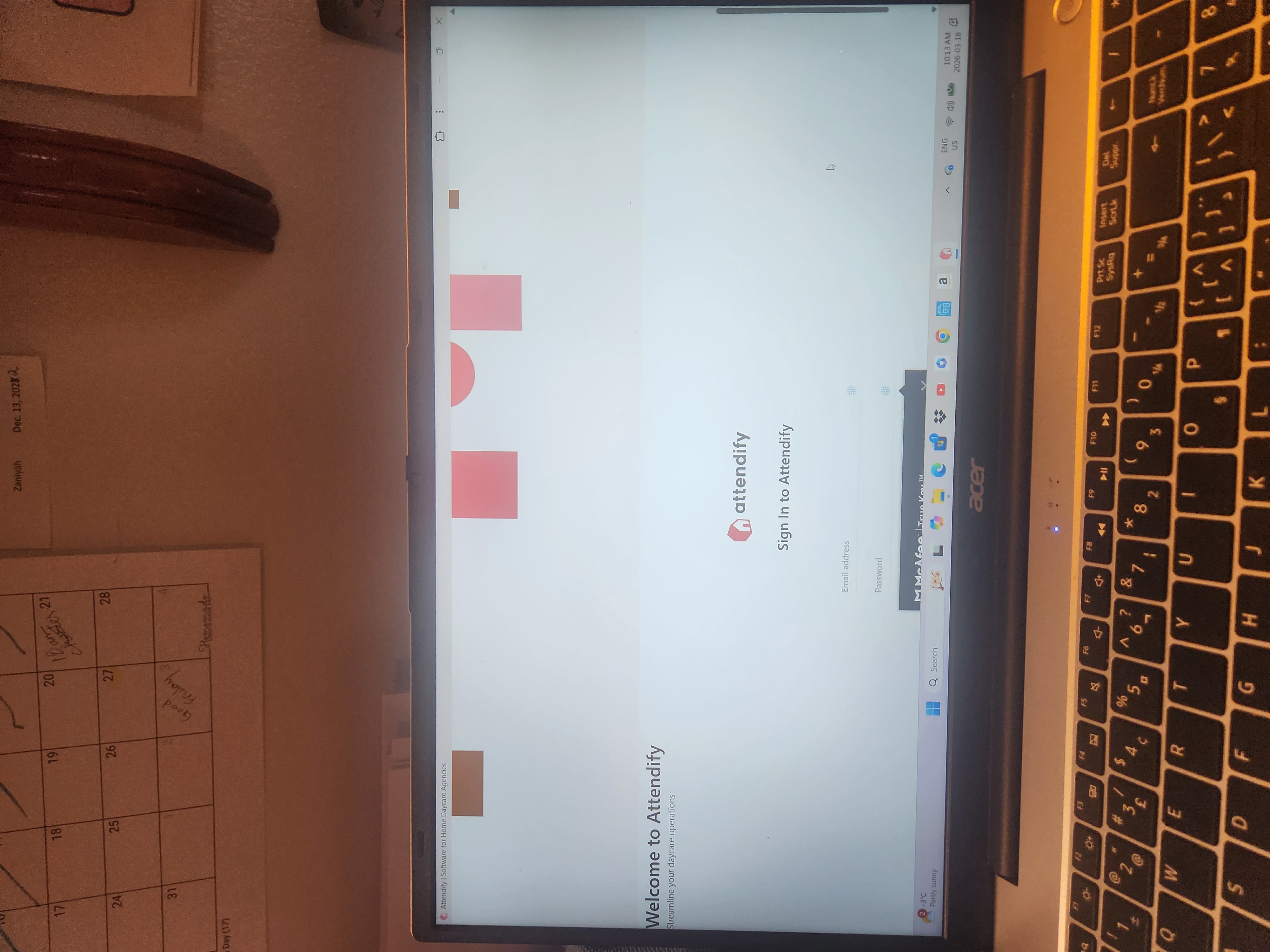
A
Anonymous
• 5 months ago
@dloveman842_5754 Also

Add a Comment